


Boot Barn
4.8741.00 Reviews
App Specs
- Version
- 4.0.15
- Updated On
- License
- Free
- Downloads
- 500,000+
- Developer
- Boot Barn
- Categories
- Shopping
- Platform
- Android
Screenshots

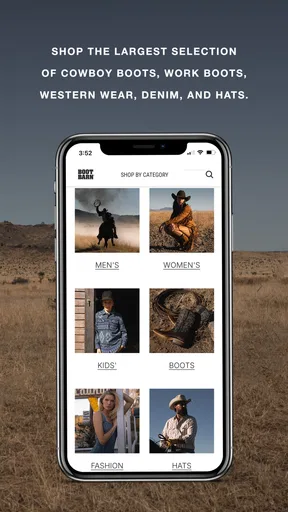

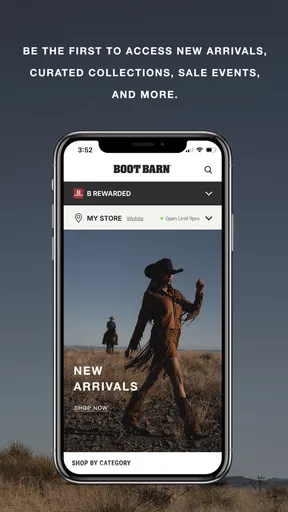
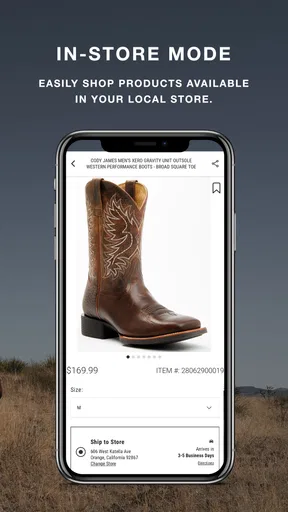

 Analysis by AppCompare
I approached Boot Barn as a practical shopping app rather than a digital version of a full western store. Its focus is clear: helping me browse cowboy boots, work boots, clothing, hats, and other western fashion from a phone. That narrow purpose is a strength when I already know the kind of item I want, although it also means the experience is less useful for someone looking for general clothing or a broad marketplace.
Developed by Boot Barn, this free shopping app is aimed at Everyone and runs on Android devices using version 7.0 or later. It has reached over 500 thousand installs and holds a 4.8 average from around 5 thousand ratings, which gives it a reassuring first impression. After using it, I found the most important question is not whether it has a large catalog in the abstract, but whether its focused selection matches your needs and whether you are comfortable making footwear decisions from a phone screen.
How the shopping experience feels in everyday use
The opening experience is straightforward. I can move from the general western-fashion idea to a more specific shopping mission without feeling that the app is trying to be a social feed or a general-purpose marketplace. That matters when I am looking for something practical, such as work boots, rather than casually browsing endless unrelated products.
In my experience, the app feels best when I begin with a clear goal. Searching for a type of boot, checking clothing for a particular style, or looking through hats is more efficient than opening the app with no idea what I want. A focused catalog reduces the mental effort of comparing unrelated brands and categories, but it does not remove the need to inspect each product carefully.
The app’s perceived speed is suitable for normal browsing. Pages feel most responsive when I move through a small number of categories and open products one at a time. Product-heavy shopping screens naturally require more patience than a simple text page, especially when images are loading, so I would not judge the app by an instant response during every transition. What matters is that the browsing flow remains understandable rather than leaving me unsure whether a tap worked.
I also prefer using it when I have a stable connection and enough time to examine products properly. That is not a criticism unique to Boot Barn; boots and clothing are visual purchases, and images carry much of the information. If I am standing somewhere with a weak connection and trying to make a rushed purchase, the experience is less comfortable than browsing later from home.
Where the app saves time
The biggest time saver is the specialized focus. A general shopping marketplace may offer more categories, but it can make western boots and workwear harder to compare because they sit among unrelated products. Here, I can keep my attention on the type of item I actually came to find.
Worth Reading Before You Choose

EA SPORTS FC Mobile 26 Is a Bigger Football Game, but It Takes Time

Flipboard Shows What News Apps Must Do Beyond the Feed

Switching to Android Auto Means Rethinking Your Driving Routine

Google Calendar Makes a Crowded Week Easier to Manage

Ludo King Makes the Most of the Minutes Between Plans

Baby Panda World Brings Quick Play to Modern Phones, but Its Game Library Feels Busy
A useful workflow is to start broad, narrow the category, and then compare only a few realistic candidates. I avoid opening every attractive boot in succession because that quickly turns shopping into a memory test. Instead, I note the differences that matter to me: intended use, overall shape, color, and whether the design suits daily work or occasional wear. This approach makes the app feel faster because I am using its catalog deliberately rather than fighting information overload.
Another practical advantage is separating browsing from deciding. I can use the app to discover styles while commuting or during a break, then return later when I am ready to check the details again. That is more useful than treating the first appealing image as an automatic purchase decision. For footwear in particular, a slower second look can prevent an uncomfortable or impractical choice.
What happens during heavier browsing
The demanding moments come when I move rapidly through image-rich product pages, change categories repeatedly, or compare several kinds of merchandise in one session. That is when any shopping app can feel less immediate than it does during simple navigation. Boot Barn remains easier to handle when I give each page time to settle instead of tapping through a long chain of screens.
I would describe the resource demand as moderate for a shopping tool, with the visual catalog doing most of the work. I would not open it expecting the same lightness as a notes app. On an older phone, keeping many other applications active at the same time may make returning to a product less seamless, because the operating system can refresh an app that has been left in the background. That is a general device constraint rather than a confirmed defect in this application, but it is worth considering if your phone has limited memory.
For a realistic example, imagine that I need work boots before the weekend. I might first browse the work-boot section, inspect a few shapes, switch to clothing to see whether a jacket fits the same practical style, and finally return to the boots. That session is manageable, but I would not try to do it while rushing between appointments. The better routine is to shortlist products during a quiet moment and make the final decision when I can inspect sizes, materials, and images without distraction.
Heavy use also exposes a trade-off between variety and certainty. More products give me more chances to find the right western style, but they also make it easier to lose track of why one item was preferable to another. I recommend keeping the comparison narrow and writing down the key reason for each candidate. This small habit is especially helpful when several boots share a similar silhouette.
Reliability and recovering from interruptions
Reliability in a shopping app is not only about whether it opens. I also want to return to the item I was viewing, recover after an interruption, and continue without rebuilding my search from the beginning. Boot Barn is most dependable when I treat it as a browsing tool and keep my shopping process organized rather than relying on a single long session.
If a phone call, notification, or temporary connection problem interrupts me, I first return to the app and check whether the current page is still present. If it is not, I repeat the last category step instead of assuming that every previous screen will be restored exactly as I left it. This is a sensible recovery habit for mobile shopping generally, especially on older Android hardware.
I also avoid making a purchase decision solely from a remembered image. If the app has been closed or the session has been interrupted, I reopen the product and review the details again. That may sound cautious, but it is valuable for boots and clothing, where a small difference in design can change whether an item suits work, outdoor use, or casual wear.
The app’s strong user reception makes it easier to approach with confidence, but a high average rating should not replace my own checking. People shop for different reasons: one person may care about western style, another about rugged daily use, and another about finding a particular hat. The app can support all three missions, but the quality of the final choice still depends on how carefully I evaluate the product.
Device limits and the right expectations
Boot Barn supports Android 7.0 and later, so it is accessible on a wide range of Android devices. That broad compatibility is useful if I am not using a recent phone, but compatibility does not guarantee identical comfort everywhere. A newer device will generally feel better during image-heavy browsing, while an older model may need more patience when switching between several product pages.
I would not choose this app if my main requirement were the absolute lightest possible shopping experience. Its purpose involves visual merchandise, and images are central to judging boots, hats, and clothing. Someone with a small screen may also find detailed comparisons less comfortable than on a larger phone or computer. In that situation, I would use the app for discovery and then take more time with the final review on a larger display if that option is available.
It is also not the right choice for every shopper. If I want a general marketplace with household goods, electronics, groceries, and western clothing in one place, a broader shopping service is more convenient. If I already know a precise product and prefer buying directly from a manufacturer, that manufacturer’s own store may offer a simpler path. Boot Barn makes more sense when the western and workwear focus is part of the reason I am shopping.
The free price removes a barrier to trying it, which is important because I can explore the catalog before deciding whether it fits my habits. I still keep normal mobile-shopping discipline: I check the item carefully, avoid rushing because an image looks appealing, and make sure the product suits the intended use. Free access makes experimentation easy; it does not make every product automatically right for me.
Useful habits for boots, workwear, and western fashion
My first tip is to separate style browsing from functional shopping. A cowboy boot chosen for appearance may not be the same boot I would want for long workdays. I use the app to identify designs that appeal to me, then reconsider them according to where and how I expect to wear them. This prevents the western look from overshadowing comfort and practicality.
My second tip is to compare within one purpose at a time. Mixing work boots, casual boots, hats, and clothing in one rapid session makes the catalog feel larger but the decision less clear. I get better results by finishing a short boot comparison before moving to another category. That workflow also reduces repeated loading and unnecessary back-and-forth, which helps the app feel more responsive.
My third tip is to use the app as a planning tool before a time-sensitive purchase. If I need an outfit or work item soon, I browse earlier rather than waiting until the last minute. The app is useful for forming a shortlist, but I would not depend on hurried browsing when sizing, intended use, or style coordination matters.
A fourth insight is that the focused catalog changes how I judge value. I am not only asking whether one item looks good; I am asking whether the specialized selection helps me avoid compromise. If I want a western wardrobe or workwear with a consistent visual direction, the focus is genuinely helpful. If I only need one generic garment, the advantage is smaller and a general retailer may be quicker.
Who will enjoy it most
I would recommend Boot Barn to someone who regularly wears cowboy boots, work boots, western clothing, or hats and wants a dedicated place to browse those categories. It is also useful for gift research when I know the recipient’s style but need to explore several types of western merchandise before choosing. The app’s focused identity makes those tasks feel more natural than searching through a broad marketplace.
It suits patient shoppers better than impulsive ones. I like it when I can compare a few options, return to the details, and think about how an item will be used. Someone who wants a one-tap decision based only on the first image may find the process more involved, particularly with footwear.
I would skip it when my shopping needs are unrelated to western fashion or workwear, or when I strongly prefer examining boots in person before buying. A physical store can provide a more direct sense of fit and feel, while a broad marketplace may be better for one-stop shopping across many categories. The app’s specialization is its reason to use it, not a universal replacement for every shopping method.
My performance verdict after using it
Boot Barn delivers a focused mobile shopping experience with reasonable speed expectations, a catalog that rewards organized browsing, and broad Android compatibility. I found it most comfortable when I used it in short, purposeful sessions rather than treating it like an endless entertainment feed. The app does not need flashy extras to be useful; its value comes from keeping western and workwear shopping in one focused environment.
Its main limitations are practical rather than dramatic. Image-rich browsing can be less comfortable on older or smaller devices, interruptions may require me to retrace my steps, and no mobile catalog can fully replace trying on footwear when fit is critical. Those are important trade-offs, but they do not undermine the app’s purpose.
The current version is 4.0.15, and the app remains free to try. With its Everyone age rating, strong average reception, and established install base, I see it as a sensible option for shoppers whose needs match its specialty. My recommendation is simple: use it when western and workwear selection matters, browse with a clear purpose, and give footwear decisions more time than a quick scroll.
Pros
- Easy browsing by footwear
- clothing
- western gear
- and workwear categories.
- Detailed product photos help assess materials
- colors
- and design before ordering.
- Store locator makes it simple to find nearby Boot Barn locations.
- Order tracking keeps delivery updates accessible from the app or website.
- Frequent promotions can make premium western brands more affordable.
Cons
- Some popular sizes and styles may sell out quickly online.
- Product prices can be high
- especially for premium boots and branded apparel.
- Fit may vary between brands
- making online sizing less predictable.
- Shipping costs or return conditions may reduce the value of smaller orders.
- The selection focuses heavily on western and workwear styles
- limiting casual options.
FAQs for Boot Barn
What is Boot Barn, and what can I buy through the app?
Boot Barn is a shopping app focused on Western and workwear products. After exploring it, users can browse categories such as cowboy boots, work boots, clothing, hats, belts, accessories, gifts, and selected lifestyle items. Product pages generally include photos, descriptions, available sizes, colors, prices, and customer ratings, making it easier to compare options before placing an order.
Is the Boot Barn app free to download and use?
Yes, the Boot Barn app is generally free to download from the official Android or iOS store. There is no separate fee for browsing products, checking prices, reading descriptions, or managing your account. However, purchases, delivery charges, taxes, and any optional services are paid separately. Availability and app features may vary depending on your country and device.
Can I order products through Boot Barn and track my delivery?
The app is designed to let customers shop directly from Boot Barn, add products to a cart, choose available shipping options, and complete checkout using supported payment methods. Once an order is accepted, users can usually view order details and follow shipment progress through their account or confirmation messages. Delivery times may differ according to stock, location, and shipping method.
Does Boot Barn offer returns, exchanges, or help with sizing?
Boot Barn provides product information intended to help customers select the correct item, including size options, descriptions, and, where available, fit guidance. Because boots and clothing can vary by brand, checking the size chart before ordering is recommended. Return and exchange eligibility may depend on the product condition, purchase details, exclusions, and the current official policy, so review those terms before buying.
Is a Boot Barn account required to shop in the app?
Some browsing features can typically be used without creating an account, allowing visitors to search products, view categories, and read item information. An account may be useful for saving details, reviewing previous orders, managing addresses, receiving personalized offers, and tracking purchases more conveniently. Before downloading, users should also check the app’s requested permissions and review Boot Barn’s privacy policy.


